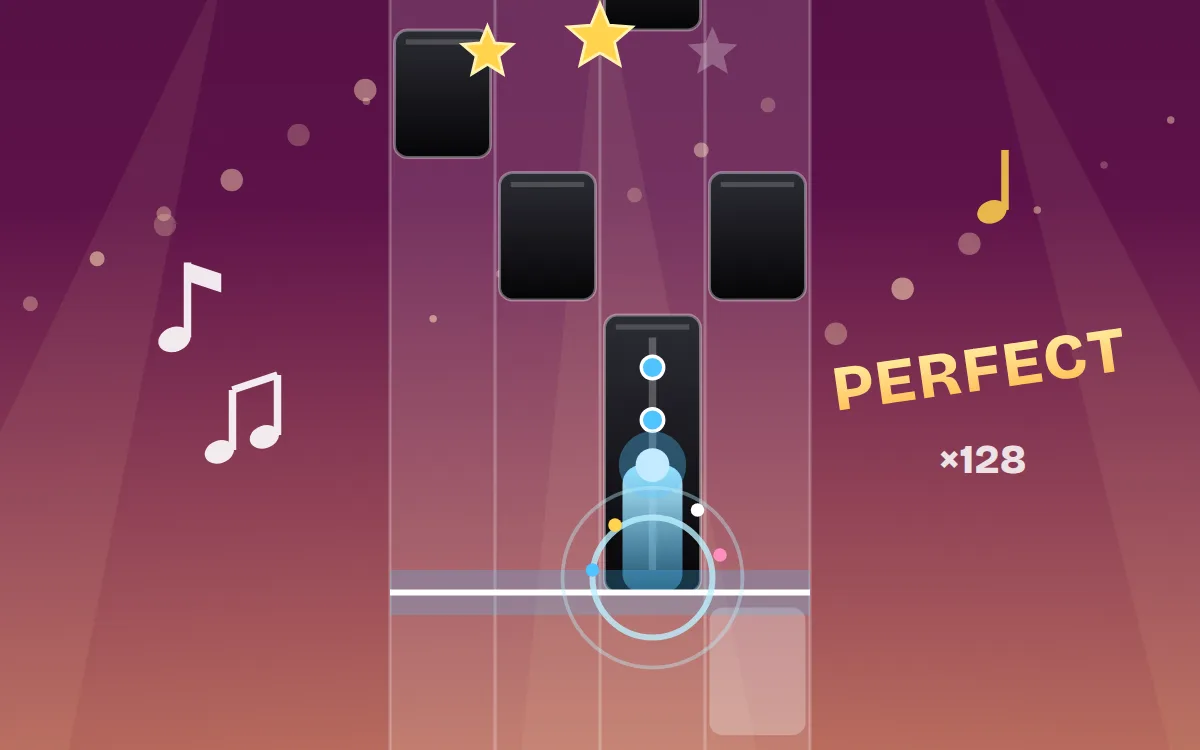
Rhythm Tap is a free music game in the style of piano tile games: black tiles scroll down four lanes, and every tile you tap plays the next note of the song, so you are the one performing the melody over a live backing track. Play Für Elise, Canon in D, the Turkish March and fifteen more public-domain classics, five original tracks, an endless mode and battles against a rival.
Pick a song and tap the blue START tile. From then on the tiles keep moving and the backing music plays in time with them.
- Tap the lowest black tile as it reaches the glowing line near the bottom, always in order from the bottom up. On a keyboard the four lanes are D, F, J and K, or the four arrow keys.
- Every tap plays the song's next note, on piano or the instrument you choose.
- Long tiles are holds: keep your finger or key down until the tile ends. The dots along a long tile are extra points as the trail fills up.
- Two tiles side by side are a double: tap both lanes.
- Tapping a lane with no tile in it, or letting a tile slide off the bottom, ends the run.
You earn a star at one third of the song, a second at two thirds and the third when you reach the end. The tiles speed up gently as the song goes on.
After three stars the song carries on from the top, faster each time. Finish the first faster pass for one crown, the next for two and the last for three crowns, the top rating for any song. Your best stars, crowns and score are saved for every song in this browser.
Your score is simple: one point for every tile you tap and one for every dot you collect on a long tile. A combo counter shows how many tiles you have tapped in a row. Each tap is also graded Perfect when it lands within about a tenth of a second of the line, Great within a fifth, and Good otherwise, so you can tell how close to the beat you are playing.
If the timing feels off on your speakers or headphones, open Settings and move the timing offset. Raise it if taps feel judged early, lower it if they feel late.
When a run ends you can revive once: spend one gem or 150 coins, the tiles rewind a little to just before the missed tile, and play resumes after a 3, 2, 1 countdown. You start with 150 coins and 3 gems.
Songs pay coins for every star and crown, with a bonus the first time you reach each one. Winning a battle and scoring in Endless pay coins too. Spend them to unlock more songs, tile skins (classic black, neon glow, glass, sakura and gold) and backgrounds (concert hall, night city, sunset and starry sky).
Every day one locked song is free to play, the same one for everyone. Earn three stars on it to complete the daily challenge. There is also a free daily chest with coins and sometimes a gem, and three daily missions such as tapping a number of tiles, reaching a combo or winning a battle. Each finished mission pays out coins when you claim it.
Endless chains your songs one after another without a break, faster with every song, until you miss. Your best Endless score is kept, and it pays coins as you go.
Battle puts you up against a rival on the same song. Two score bars race at the top of the screen. Rivals have different skills, and each one slips at some point in the song, so outlast them and outscore them to win.
Every piece is in the public domain and arranged with its own bass and chords so it sounds full. Only well-known sections that match the published scores are used, and short themes loop to fill the song.
- Popular and classical: Für Elise, Ode to Joy and the Moonlight Sonata opening (Beethoven), Canon in D (Pachelbel), Turkish March (Mozart), Minuet in G (Petzold), Swan Lake (Tchaikovsky), Brahms' Lullaby, Can-Can (Offenbach), The Entertainer (Joplin), Greensleeves and In the Hall of the Mountain King (Grieg).
- Kids: Twinkle Twinkle Little Star, Mary Had a Little Lamb, Happy Birthday and Brahms' Lullaby.
- Holiday: Jingle Bells, Silent Night and We Wish You a Merry Christmas.
- Originals: Paper Lanterns, Monsoon Drive, Rickshaw Funk, Rooftop Kites and Neon Bazaar, five tracks written for this game.
- Each song shows its composer, a genre tag and a difficulty from one to five bars. Several start unlocked, and the rest cost coins.
There are no audio files. The piano is built live in your browser from a set of slightly out-of-tune overtones that fade at different speeds, a soft hammer knock at the start of each note and a damper when you lift your finger, all sent through a small concert-hall reverb. Each song has its own instrument, and in Settings you can switch to piano, electric piano, music box or a bright synth pluck. You can also set the volume of the backing music.
Piano tile games are about rhythm as much as speed.
- Look a couple of tiles ahead, not at the tile you are tapping.
- Tap in time with the music. The tiles are spaced exactly like the notes.
- Use two thumbs on a phone, or two fingers per hand on D, F, J and K.
- On a long tile, keep holding while you tap the next tiles with your other hand.
- Save gems for revives on songs where you are close to a new crown.
- Learn a hard song's tricky passages at the first, slowest speed before chasing crowns.
On touch screens tap the lanes directly, and several fingers can be down at once. On a keyboard use D, F, J and K or the arrow keys, hold the key for long tiles, press Space to tap START, and P or Escape to pause. Pausing, or switching tabs, stops the music. Resuming rewinds a little and counts down from 3. With reduced motion turned on, particles and pop-ups are switched off. A first-time tutorial shows the basics and can be replayed from Settings, and the game is fully available in English and Urdu.